
Increase customer retention with discounts that reset
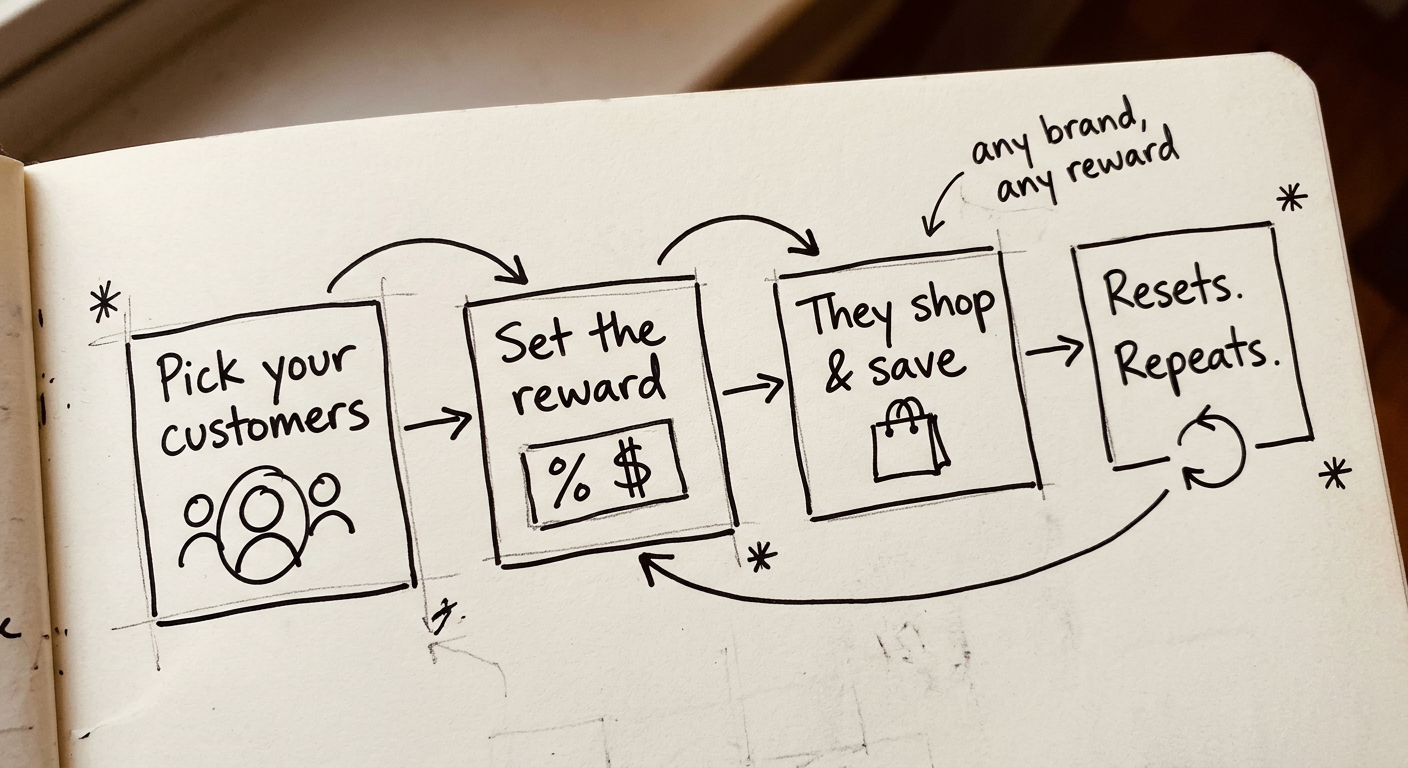
Reward loyal customers with bigger discounts—capped and reset on a schedule you choose, protecting your margin while giving them a reason to keep coming back. No codes, no manual tracking.
Logged-in customers only
Eligibility is tied to an enrollment, never to a shareable code.
Hard spending caps
Rewards stop at the limit and start again on the next cycle.
Visible cost of loyalty
Attributed sales next to discount investment, per program.
Use cases
Real ways Program Manager can keep customers coming back to your brand
Whether it's your earliest customers, a partner team, or a specific community — set the discount, the limit, and how often it resets.
Rewarding your earliest customers, without giving away too much
You want to thank the customers who've been with you since day one — but an open-ended discount can quietly become too generous over time.
- Enroll a select group of loyal customers into a 20% discount program
- Cap it at $1,500 in discounted spend every 90 days
- Anything beyond that isn't discounted until the next quarter resets
Locking in a group deal with a school or sports team
You want to offer a real discount to a team or school — but only while they're actually active, not indefinitely.
- Enroll staff and players into a 15% discount program
- Cap it at $500 in discounted spend every 30 days
- Set enrollment to expire each term or season, so only active members keep the discount
Giving back to a specific community, safely
You want to reward a group like healthcare professionals — but need a way to keep it meaningful and controlled, not open to anyone.
- Launch a "Community Drive" program at 25% off
- Cap it at $750 in discounted spend, resetting monthly
- Set enrollment to expire after a year, so access stays current
How it works
See it in action
A quick walkthrough of setting up a program and watching the discount apply automatically at checkout.
Using the app
Full control over every program and customer
Reward loyal customers with bigger discounts, without losing margin
Set the discount %, spending limit, and reset schedule — rewards stay generous but capped, renewing automatically each cycle.
Rewards and cycle settings
Configure the reward and eligibility rules for this program.
How often eligibility and rewards reset. Must be less than enrollment validity.
How long customers stay enrolled before membership expires.
Maximum discounted spend for each cycle. Must be greater than zero.
Choose exactly which customers get rewarded, and for how long
Enroll customers individually or in bulk via CSV, and pause or expire access whenever you need to.
Enroll customer
| Customer | ||
|---|---|---|
| Ayumu Hirano | ayumu.hirano@example.com | |
| Russell Winfield | russell.winfield@example.com | |
| Karine Ruby | karine.ruby@example.com | |
| Alice Anderson | alice.anderson@example.com | |
| Ben Brown | ben.brown@example.com | |
| Chloe Clark | chloe.clark@example.com | |
| Daniel Davis | daniel.davis@example.com | |
| Emma Evans | emma.evans@example.com |
See who's earning discounts and how much it's costing you
Track every enrollment, remaining cycle spend, and lifetime discount per customer from one dashboard.
Enrolled customers
75All active
Active in programs
75100% of enrolled
Program value (lifetime)
Attributed sales: $17,845.00
Discount investment: $2,782.50
127 orders with discount
| Customer | Program | Enrolled | Lifetime discount | Status | ||
|---|---|---|---|---|---|---|
Mara Whitfield mara.whitfield@gmail.com | Loyalty VIP | 2026-06-12 | $58.25 | Active | ||
Devon Castellano devon.c@gmail.com | Community Drive | 2026-02-18 | $212.00 | Active | ||
Priya Nadkarni priya.nadkarni@gmail.com | Loyalty VIP | 2026-07-22 | $37.50 | Active | ||
Tobias Reinhardt tobias.r@gmail.com | Community Drive | 2026-01-25 | $172.50 | Active | ||
Sloane Avery sloane.avery@gmail.com | Loyalty VIP | 2026-08-29 | $187.65 | Active |
Cap and reset discounts, so customers have a reason to return
Use per-customer overrides to tune the cycle, limit, validity, or discount % for specific accounts.
Program settings
A customer can be enrolled in only one program at a time.
Overrides
Override cycle start, length, or validity for this customer. Discount and cycle limit always follow the enrolled program.
Must be on or after the enrollment date and before enrollment validity ends.
How long each cycle lasts for this customer. Must be less than enrollment validity.
Override how long this customer stays enrolled.
Pricing
Plans that scale with your order volume
Pick the tier that matches the number of programs and enrollments your store needs. All plans include automatic checkout discounts, per-customer overrides, and dashboard insights.
Starter
or $559/year · save 5%
- 1 active program
- 350 active enrollments
- In-app chat support
Growth
or $1,099/year · save 7%
- 1 active program
- 800 active enrollments
- Bulk enroll customers
- In-app chat support
Scale
Popularor $3,299/year · save 8%
- 2 active programs
- 3,000 active enrollments
- Bulk enroll customers
- In-app chat support
- Blockout dates
- Dedicated email support
Enterprise
or $5,449/year · save 9%
- 5 active programs
- 8,000 active enrollments
- Bulk enroll customers
- In-app chat support
- Blockout dates
- Dedicated email support
- Dedicated chat support
*All prices in USD
FAQ
Frequently asked questions
How do spend cycles and spending limits work?+
Each enrollment tracks spend toward a cycle limit over a cycle length (for example, 30 days). Spend counts as merchandise total as if the program discount was not applied. When a paid order uses the program discount, remaining cycle spend updates. Checkout reads the last synced remaining balance from customer metafields, so rapid successive checkouts can briefly overshoot until paid orders sync. When the cycle ends, it can roll forward; Settings control whether discounted spend carries into the next cycle. Gift card purchases never receive the program discount and never count toward cycle spend.
Can program discounts stack with other discounts?+
Only if Allow stacking with other discounts is on in Settings, and the other discount also allows combining. Otherwise the program automatic discount may not combine with product, order, or shipping discounts.
What happens when cart spend exceeds remaining cycle spend?+
Settings control this: discount only the remaining eligible spend, apply no discount, or cap the discount amount. Pick the behavior that matches how you want limits enforced at checkout. These rules apply to a single cart against the last synced remaining balance; see the FAQ on rapid successive checkouts for multi-tab overshoot.
Does entering an enrolled customer’s email at checkout apply the discount?+
No. Program discounts apply only when the customer is logged into their Shopify account with an active enrollment. Entering an enrolled email as a guest does not apply the discount, even after refreshing checkout. Ask customers to sign in before or during checkout.
How does bulk enroll work?+
On Growth plans and above, Customers lets you upload a list of customer emails to enroll into a program. Already-enrolled customers and emails not found in your store are skipped. Check the result toast for enrolled vs skipped counts.
What are enrollment overrides?+
On a customer’s enrollment you can override cycle length, spending limit, validity, or discount percent for that person only. Leave overrides empty to use the program defaults.
Start rewarding loyal customers — without losing margin
Create your first program in minutes. Set the discount, the limit, and how often it resets — giving customers a reason to keep coming back.